Introduction to the Valorant API
Assuming you’ve read the Installing valorant.py guide, you’re almost ready to start interacting with the Valorant API. But first, you need an API Key.
Getting an API Key
If you haven’t already, head over to the Riot Games Developer Portal and log in or create an account.
Go back to the home page, scroll down a bit and look for the Developement API Key section. It should look like this:
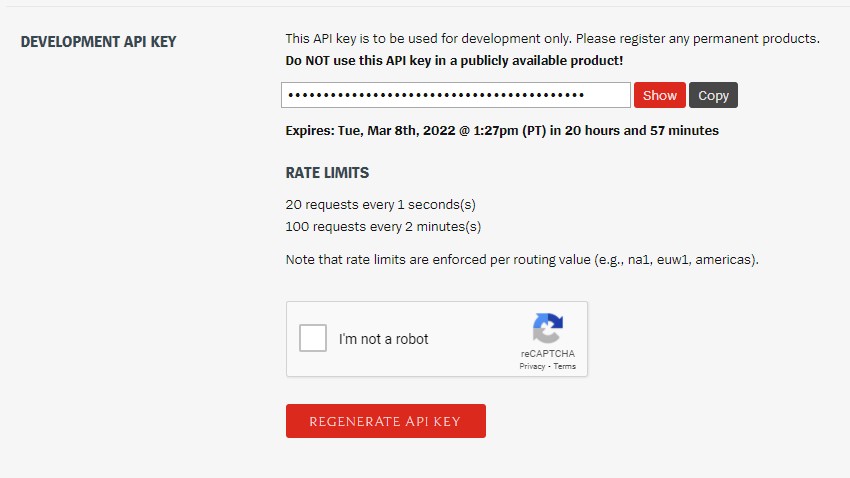
Generate a new API key, and copy it into your project enviornment. (Enviornment variable,
.envfile, etc.)That’s it! You’re ready to access the API using
valorant.pynow.
Making Requests
Now let’s get started using the library. Creating a new Python file, val_example.py, let’s put in some sample code:
 1import os
 2import valorant
 3
 4KEY = os.environ["VALPY-KEY"]
 5client = valorant.Client(KEY, locale=None)
 6
 7skins = client.get_skins()
 8name = input("Search a Valorant Skin Collection: ")
 9
10results = skins.find_all(name=lambda x: name.lower() in x.lower())
11
12print("\nResults: ")
13for skin in results:
14    print(f"\t{skin.name.ljust(21)} ({skin.localizedNames['ja-JP']})")
That’s a lot to cover, so let’s run through it step by step.
The
importstatements let us use the packages we need.osto access or API key from the enviornment, andvalorantto interact with the API.The 5th line creates an instance of the
Client, which represents our connection to the Valorant API. By settinglocaletoNonewe can get content data in other languages, which will be handy in a second.Next we make a request to the API for data on Gun and Melee Skins. This is a
ContentListofContentItemDTOobjects, each representing a Skin.Now we want to get a skin collection name from the user, and show them all the gun skins in that collection. So the 8th line will get the user’s input as
name.The 10th line is the most important of all. Here we use the query function
ContentList.get_all()in order to serch the list of skins. We want to match every skin that has the given collection in its name, so we use the expressionname in x.name.xis the skin object, and by passing that expression as a lambda into the attribute, that expression will be matched against every skin in the list.Now that we have our list of skins in the
resultsvariable, let’s print it out to the user! Lines 13 and 14 loop through the results and print each skin’s name in a nice and neat manner :>And as an added bonus, because we didn’t give the client a locale, we can also display each skin’s Japanese name as well, using
skin.localizedNames['ja-JP'].
Now to run it!
$ python val_example.py
Assuming everything goes well, your program should run smoothly and look like this:
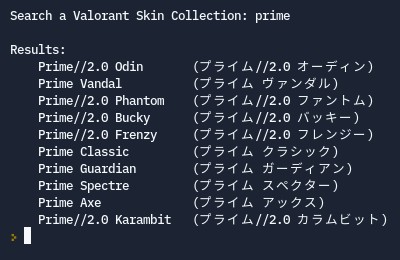
Congrats, you’ve written your first program with valorant.py! Check out the other guides for more.